quick_share_row: sharing without the deep-link boilerplate
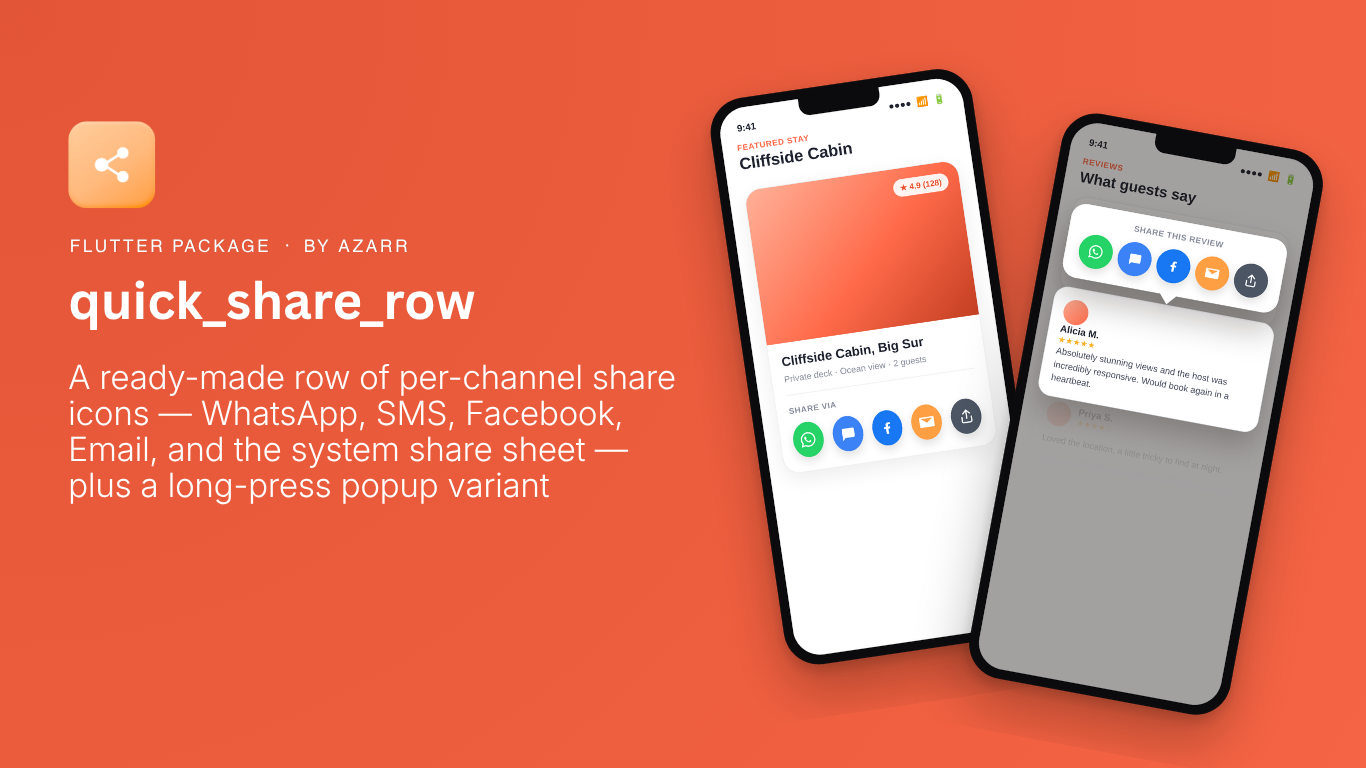
A ready-made row of per-channel share icons — WhatsApp, SMS, Facebook, Email, and the system share sheet — plus a long-press popup variant, so you don't have to hand-wire url_launcher deep links every time a screen needs a share UI.

We just published quick_share_row, a small Flutter package pulled out of Masters Konnect's review and booking screens. This isn't really an announcement — it's documentation. What the package does, and how to use it.
The problem it solves
Every app that lets someone share a listing, a review, or a booking ends up writing the same handful of deep links: wa.me for WhatsApp, sms: for text messages, Facebook's sharer.php, mailto: for email, and a fallback to the OS share sheet for everything else, all wired up through url_launcher by hand. Masters Konnect had this logic in two separate places — an inline share row under service listings, and a long-press context menu on reviews — hand-written, slightly out of sync with each other, and tied to that app's own models. quick_share_row is that logic extracted, generalized, and published, so it doesn't get rewritten from scratch in the next app.
Install
dependencies:
  quick_share_row: ^0.1.6
The inline row
import 'package:quick_share_row/quick_share_row.dart';

ShareButtonsRow(
  message: 'Check out this listing!\n\nhttps://example.com/item/42',
  url: 'https://example.com/item/42',
  subject: 'A listing you might like',
)
Renders a row of circular, tooltip-labeled icon buttons — WhatsApp, SMS, Facebook, Email, then the system share sheet — using ShareChannel.defaults. Each tap already knows what to do; there's no onTap to wire up yourself.
The long-press popup
Same row, shown as a floating popup anchored to wherever the gesture happened, for a context-menu-style share UI:
GestureDetector(
  onLongPressStart: (details) => showShareMenu(
    context,
    details.globalPosition,
    message: 'Check out this listing!\n\nhttps://example.com/item/42',
    url: 'https://example.com/item/42',
  ),
  child: YourListItem(),
)
The popup's menu item is deliberately non-interactive (enabled: false) — only the icons inside it respond to taps. The original app's version let a tap register on both the icon and the menu item underneath it at once, which could double-share. Disabling the item closes that off.
Picking channels, or calling one directly
// Only WhatsApp and the system sheet:
ShareButtonsRow(
  message: message,
  channels: [ShareChannel.whatsapp, ShareChannel.system],
)

// Trigger one channel from your own UI, no row or popup needed:
ShareUtils.toWhatsApp(message, onError: (e) => print('Failed: $e'));
ShareUtils is a set of stateless static methods — toWhatsApp, toSms, toFacebook, toEmail, toSystem, plus a share(channel: ...) dispatcher that ShareButtonsRow and showShareMenu both call internally. None of them need a BuildContext, so they're safe to call from a provider or notifier, not just a widget's tap handler.
Customizing a channel
Every built-in ShareChannel — whatsapp, sms, facebook, email, system — is a copyWith()-able constant. Change just the color:
ShareButtonsRow(
  message: message,
  channels: [
    ShareChannel.whatsapp.copyWith(color: Colors.teal),
    ShareChannel.system,
  ],
)
Or replace the icon entirely with a brand asset via customChild. The package itself has no flutter_svg (or any image-loading) dependency — it just renders whatever widget you hand it:
ShareChannel.whatsapp.copyWith(
  customChild: SvgPicture.asset('assets/icons/whatsapp_brand.svg'),
)
Tinting the icons (0.1.6)
iconColor on both ShareButtonsRow and showShareMenu() tints every channel's glyph at once — separate from each channel's own color, which is the circular background behind it:
ShareButtonsRow(
  message: message,
  iconColor: Colors.black87,
)
It has no effect on a channel using customChild — an SVG or image asset brings its own coloring, so there's nothing left to tint.
Why url is separate from message
Every channel except Facebook takes free text, so message — typically your text plus the link, already concatenated — is what WhatsApp, SMS, Email, and the system sheet all use. Facebook's share dialog only ever accepts a bare URL, with no field for custom text, so pass just the link via url if Facebook is in your channel list. Leave url out and it falls back to message, which is rarely what you want once message has more than a link in it.
Error handling
Nothing in the package shows a toast or a snackbar on failure — there's no UI-feedback dependency forced on you. Pass onError if you want to react to a channel failing to launch (the target app isn't installed, the URL gets rejected); otherwise the failure is silent, the same as someone just closing the target app without sending anything.
ShareButtonsRow(
  message: message,
  onError: (e) => ScaffoldMessenger.of(context).showSnackBar(
    SnackBar(content: Text('Could not share: $e')),
  ),
)
Where to get it
- pub.dev: pub.dev/packages/quick_share_row
- Source: github.com/jaysonbal/quick_share_row
- License: MIT
Learn more at azarrapps.com/our-products/quick-share-row